

The smart glasses category has been split into two camps for years: glasses that talk to you, and glasses that show you things. The Ray-Ban Meta Display is the first product to credibly merge both. It takes the camera, speakers, and Meta AI platform that made the Ray-Ban Meta Gen 2 a genuine hit and adds a full-color monocular display capable of showing notifications, navigation arrows, live captions, and AI responses directly in your right lens. At $799 – roughly double the Gen 2's $379 starting price – Meta is betting that a heads-up display transforms smart glasses from a nice-to-have into a need-to-have.
The bet comes with asterisks. Some of what the Display does – walking navigation projected into your sightline, live translation captions during a conversation – feels like glimpses of an inevitable future. Other parts feel like reminders of how far that future still is. Whether the $420 premium over the Gen 2 is justified depends entirely on which of those experiences you encounter more often in a given day.
Design and Build
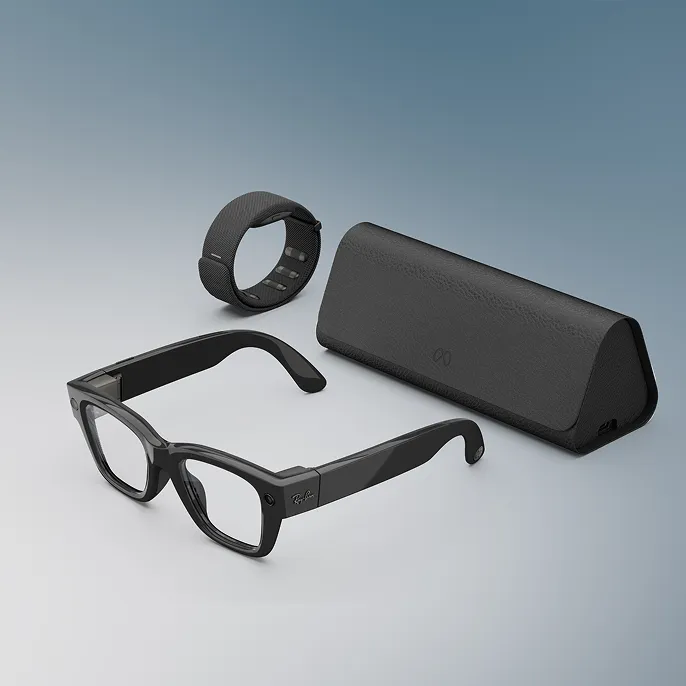
The Ray-Ban Meta Display launches in Wayfarer and Headliner frame styles across Black and Sand colorways, all with Transitions lenses that darken automatically in sunlight. The silhouettes are recognizable Ray-Ban shapes, but anyone who has worn the Gen 2 will immediately notice the difference in bulk. The frames are substantially thicker to accommodate the micro-projector and geometric waveguide optics that pipe light into the right lens. At 69 grams (70 grams for the large size), they weigh about 21 grams more than the Gen 2's 48 grams. That gap matters when something sits on your nose all day.
Comfort is acceptable for the first few hours and becomes noticeable by hour five or six. The nose pads bear more weight than standard Ray-Bans, and the glasses tend to slide forward during movement. The thicker temples are not uncomfortable, but they are conspicuous – these will not pass as ordinary sunglasses the way the Gen 2 does. For a product category where fashion is function, that is a meaningful concession.
Prescription lenses are available for an additional $200, supporting a range of -4.00 to +4.00 diopters with Transitions coatings. Expect a 5-to-8-week wait for prescription orders. The Transitions lenses work well outdoors but have the standard limitation of not activating inside vehicles, which is worth knowing if you planned to use navigation while driving.
The charging case is a collapsible folding design that provides up to 24 hours of additional charge (30 hours total including the glasses). It works, but it is bulky – noticeably larger than the Gen 2's hardshell case, and extracting the glasses from it is not as smooth as it should be.
The Neural Band – the sEMG wristband included in the box – deserves its own note. Made from Vectran and weighing 42 grams, it wears like a slim fitness tracker. It reads electrical signals from wrist muscles to detect finger gestures: pinch to select, thumb-to-middle-finger to go back, double-tap and sliding motions to scroll. The system was trained on data from nearly 200,000 participants, and it works even when your hands are hidden under a table. It requires a snug fit to read signals accurately, which can leave faint pressure marks after extended wear. IPX7 water resistance means it survives showers without issue. A replacement band costs $199.
The Display
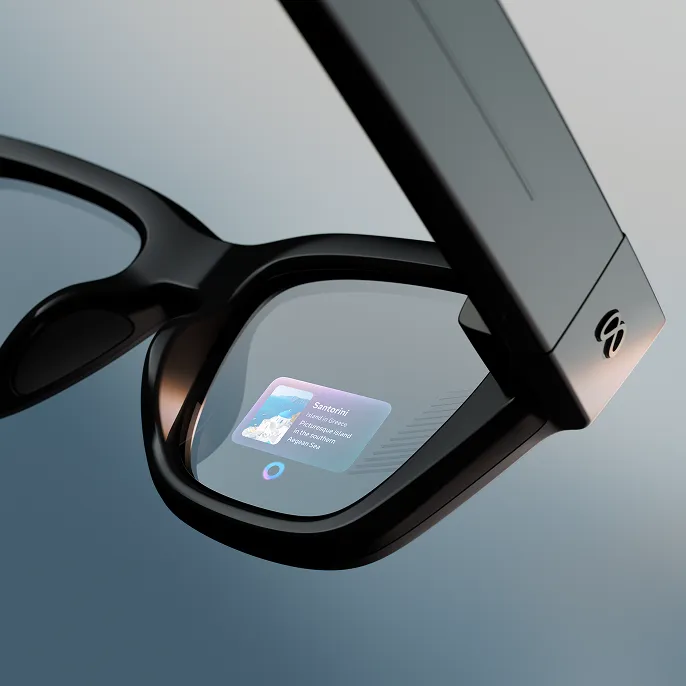
This is what the $420 premium over the Gen 2 buys, and it is the make-or-break feature. The monocular display sits in the right lens with a 600x600 pixel resolution, up to 90Hz refresh rate, and a staggering 5,000 nits of peak brightness (adjustable down to 30 nits for dark environments). The field of view is approximately 20 degrees – small, but intentionally so. Meta designed this for glanceable interactions, not immersive computing.
In practice, the display is sharp enough to read notification text comfortably, bright enough to cut through direct sunlight, and positioned slightly below and to the right of center vision so it does not obstruct your normal sightline. Content appears as a semi-transparent overlay that is perfectly legible against most backgrounds. Colors are vivid outdoors. One notable quirk: in dark rooms, the display produces visible ghosting and internal reflections in the lens. Daytime use is flawless, but nighttime use in dim environments reveals optical artifacts that break the illusion.
The use cases that work well are built around short interactions. Walking navigation projects turn-by-turn arrows and street names that feel genuinely more natural than pulling out a phone, though the navigation is currently limited to walking routes – longer driving destinations get rejected. Live captions and real-time translation display a running text feed during conversations in English, French, Italian, Spanish, Portuguese, and German. Transcription accuracy is solid for English in quiet environments; translation quality drops with background noise and less common language pairs. Using the display as a camera viewfinder with 3x zoom framing is a small luxury that meaningfully improves photo composition.
The use cases that struggle are anything requiring sustained reading. Recipes, long messages, and detailed AI responses feel cramped on the small field of view. The display auto-sleeps aggressively to save battery, which means it vanishes mid-paragraph if you pause too long. And the monocular design creates genuine eye strain during extended sessions – focusing one eye on a tiny floating screen while the other sees the unaugmented world is neurologically taxing in a way that becomes uncomfortable after as little as 10 to 15 minutes of continuous use.
Compared to the Even Realities G1, which uses a micro-LED waveguide approach in a lighter sub-40-gram frame, Meta's display is brighter and more colorful but less comfortable for sustained reading. The Even Realities G2 has since expanded its display by 75 percent and remains the better choice for text-heavy productivity use. The 20-degree FoV here is competitive for the category but miles from dedicated AR glasses. This is a notification display, not a monitor replacement, and it works best when treated as one.

Camera and AI
The 12-megapixel ultra-wide camera captures stills at up to 3024x4032 and video at 1440x1920/30fps with 3x zoom. The sensor matches the Gen 2, but video resolution is actually a step down – the Gen 2 records at 3K/30fps versus 1440x1920/30fps here. That regression at a higher price point stings. Photo quality is good in daylight, serviceable in low light, and 32GB of internal storage holds roughly 500 photos or over 100 short clips.
A persistent frustration: video records in portrait orientation only. For quick social clips to Instagram or WhatsApp, that is fine. For anyone hoping to shoot landscape video – YouTube content, travel footage, anything meant for a horizontal screen – the camera is essentially unusable. At $799, the absence of a landscape mode is baffling.
Meta AI remains the strongest AI assistant in any smart glasses. Voice queries are fast and contextually aware. Visual AI – pointing the camera at something and asking "what is this?" – works reliably for plant identification, menu translation, product lookups, and landmark recognition. The display adds a new dimension: instead of listening to a spoken answer, you read a card-style response in your lens, which is faster and more discreet. Video calling through WhatsApp and Messenger shows your point-of-view camera feed while the caller's face appears on the in-lens display. The concept is compelling, but video quality is low-resolution and the experience remains rough.
The real problem is the app ecosystem. The Ray-Ban Meta Display supports WhatsApp, Messenger, Instagram DMs, music playback, walking navigation, weather, calendar widgets, and live sports scores. There is no Gmail, no Slack, no TikTok, no third-party app store, and no sideloading. Handwriting recognition and Instagram Reels support rolled out in early 2026, but the app library remains thin. For an $800 device with a display, the limited ecosystem is the single biggest limitation.
Audio
The open-ear speaker system carries over from the Gen 2 and remains best-in-class for smart glasses – on par with the Oakley Meta HSTN, which uses a comparable speaker system in a sportier frame. Two speakers in the temples deliver clear mids with reasonable bass response. Podcasts are perfectly intelligible, and music playback is genuinely enjoyable at moderate volumes. A six-microphone array handles calls reliably even in noisy environments, and sound leakage is minimal – people standing a couple of feet away are unlikely to hear your audio.
The speakers connect via Bluetooth 5.3 and work with any phone. The addition of the display means some audio interactions can be replaced with visual ones – reading a message instead of having it read aloud – which is a welcome option in quiet environments like meetings or libraries. A Conversation Focus accessibility feature uses the microphones to enhance nearby speech, functioning like a basic hearing aid mode.
Battery Life
Meta claims up to six hours of mixed use. That number holds in lighter usage patterns – music listening, occasional Meta AI queries, periodic notification checks with the display. With moderate display use, the realistic expectation is four to five hours. Heavy display use – sustained navigation, video calling, live translation – can push the battery below 20 percent in under four hours.
The charging case adds up to 24 hours of additional battery, and quick charging delivers 50 percent in roughly 20 minutes with a full charge taking 75 minutes. The case itself needs recharging every one to two days with regular use, compared to about 48 hours for the Gen 2's case. The Neural Band lasts up to 18 hours on a charge, which comfortably outlasts the glasses.
The glasses carry an IPX4 splash-resistance rating – fine for light rain and sweat but not submersion. Compared to the Gen 2's eight-hour battery and multi-day case life, the Display model is a clear step down in endurance. The display is a power-hungry component, and there is no way around the physics. Plan on nightly charging for both the glasses and the case.
Privacy and Social Acceptability
The camera LED indicator lights up when recording, which is the same approach as the Gen 2 and a baseline requirement for social acceptability. Reactions to smart glasses have mellowed considerably since the Google Glass era, but the chunkier frames of the Display model draw more attention and questions than the subtler Gen 2.
The Neural Band is actually a net positive here. Because you can navigate the display, dismiss notifications, and control apps with subtle finger gestures under a desk or in your lap, you avoid the awkwardness of barking voice commands in public. The band is the key to discreet operation – and arguably the key to social acceptance for display glasses in general.
The display itself is completely private. Observers cannot see what is shown on the in-lens screen, even when staring directly at the wearer's face. Receiving a WhatsApp message that only you can see genuinely feels futuristic. The camera, however, raises the same privacy considerations as any camera-equipped glasses – and the display gives you more reasons to keep the glasses powered on throughout the day, which increases the window during which the camera is available.
Who It Is For and Who Should Skip
The Ray-Ban Meta Display makes sense if you are already sold on smart glasses and want the most capable pair available. Live translation and real-time captioning are transformative for frequent travelers, multilingual professionals, and users with hearing accessibility needs. Walking navigation without pulling out a phone is genuinely useful. If you are comfortable with first-generation technology and its rough edges, the hardware here is exciting.
Stick with the Ray-Ban Meta Gen 2 if you value all-day comfort, discreet aesthetics, and eight-hour battery life. If you primarily want smart glasses for music, calls, and occasional AI queries, the Gen 2 does all of that at less than half the price with a lighter, more comfortable frame. The $420 premium buys a monocular notification screen with limited apps – for most people, that is not enough yet.
Consider the Even Realities G2 if you want a display-first experience with no camera, extreme lightness, and two-day battery life. It cannot do visual AI, but for glanceable text, productivity, and prescription integration in a nearly invisible form factor, it is the better daily driver. For the complete competitive landscape, see our guides to the best smart glasses and best smart glasses with AI assistants.
The Verdict
The Ray-Ban Meta Display is a landmark product that does not quite stick the landing. The display technology is real and useful in ways that justify its existence – live translation captions, walking navigation, and camera viewfinder framing all deliver something no audio-only glasses can match. The Neural Band is a surprisingly effective input device that makes the whole system feel less like a gadget and more like an extension of intent. And the underlying Meta AI platform remains the best in its class.
But the frame bulk, eye strain from extended monocular use, anemic app ecosystem, portrait-only video, and battery life penalty are all significant drawbacks. At $799, this is an early-adopter tax on hardware that will almost certainly get thinner, lighter, and better-supported within a generation or two. It is the best display-equipped smart glasses you can buy today – but "today" is doing a lot of heavy lifting in that sentence.
| Category | Weight | Score | Weighted |
|---|---|---|---|
| Core Function (display, camera, AI, audio) | 30% | 74 | 22.2 |
| Build Quality (comfort, style, materials) | 15% | 68 | 10.2 |
| User Experience (software, daily wearability) | 20% | 65 | 13.0 |
| Value ($799 vs Gen 2 at $379, vs competitors) | 20% | 60 | 12.0 |
| Battery (display on/off, case, Neural Band) | 15% | 66 | 9.9 |
| Overall | 100% | 67/100 |
Score: 67/100 – A genuinely exciting piece of technology trapped inside a first-generation product. The display works, the AI is strong, and the Neural Band points toward a future where phones stay in pockets. But the thick frames, sparse app support, and steep price over the Gen 2 mean most people should wait for the second generation – or stick with the standard Ray-Ban Meta, which remains the smarter buy for the vast majority of users.